Arthur is four and loves letters and words. I built Grow Word around his interest in his ABCs: a small game where he can tap letters, hear them and put words together.
I used AI to help me build a learning tool for my son, with the content and controls shaped around something he already enjoys. You can try the public version here.
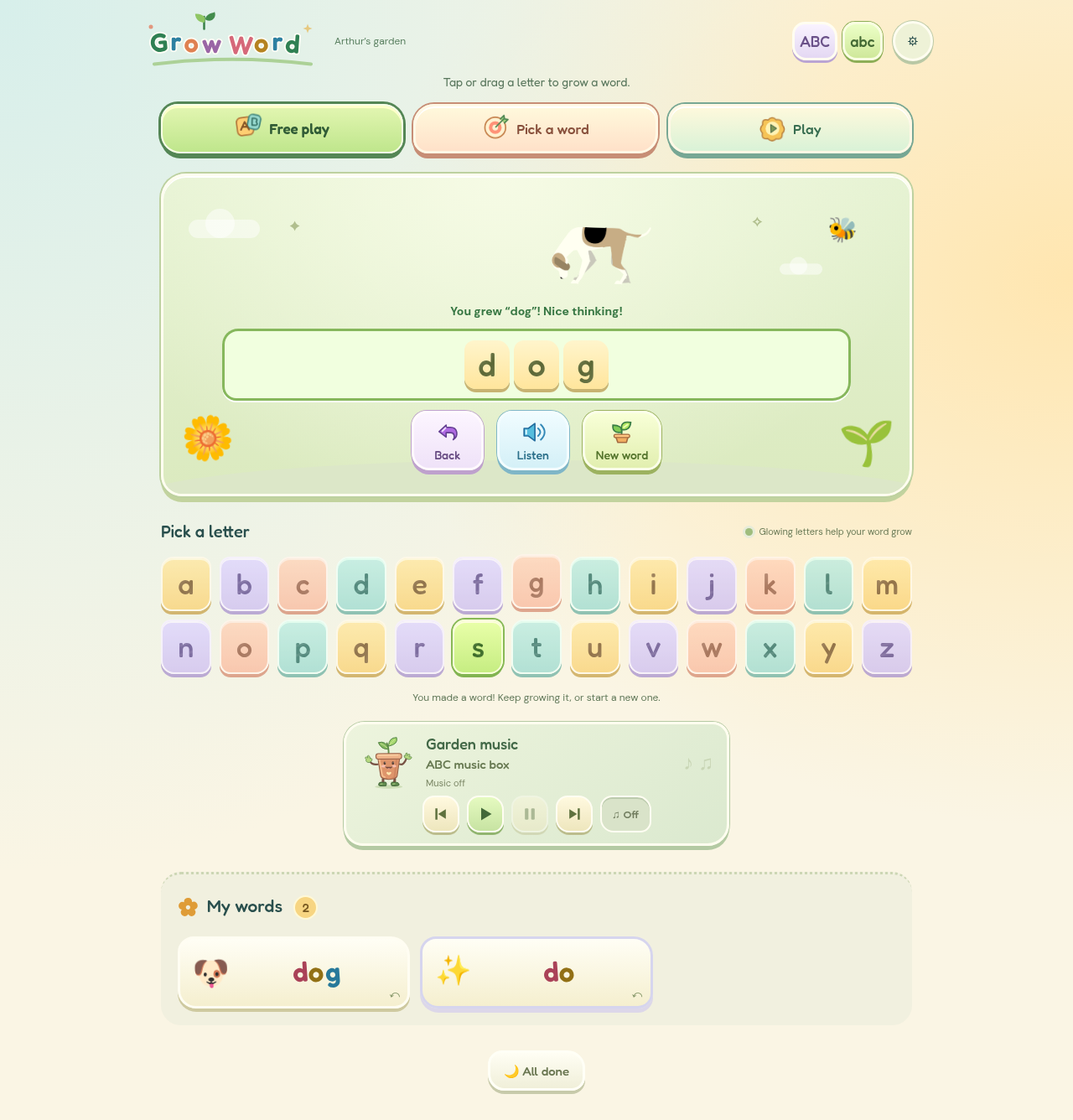
A game built around his interest in words
The main activity is straightforward. Tap or drag a letter into the word area, then add another. Letters that can continue a recognised word glow, and a completed word brings up its picture and spoken recording. There are separate controls to listen, take a letter back or start again.
Free play lets him explore. Pick a word gives him a pictured target and spelling clues. There are also short activities for matching pictures, finding letters and playing with sounds. The ABC and abc buttons switch case without clearing the word.
That personal brief matters. The game includes favourites and a grown-up notebook where a parent can add names and special words. I can change the content around Arthur's interests instead of fitting him to a fixed set of lessons.
What I built it with
The game uses HTML, CSS and plain JavaScript. The word lists and activity data live separately from the code that draws the screen. It runs as a set of static files, with no game server or account system.
I used Codex to help write and revise the code. For speech, I generated British English recordings with Kokoro, using its bf_emma voice. The public game plays those saved clips through the browser's audio tools. It doesn't make an AI request when a child taps a letter.
The little word animations were rendered in Moho and exported as animated WebP images. Still pictures take their place when reduced motion is enabled. Sprout, the plant-pot character, is SVG artwork. Fredoka and DM Sans provide the lettering, with the fonts stored alongside the game.
The small details that make it easier to use
The alphabet is reusable: spelling “bee” doesn't use up the E. A misplaced letter can be taken back without restarting. Clues can fade as a word becomes familiar, while the Help button and an always-show-clues setting remain available.
On a phone, the alphabet and word area fit together on screen. Saved words and music open in separate panels, and the main touch controls are at least 44 pixels across. I checked those layouts and the actual tap and drag controls in a browser, including smaller screens and reduced motion.
Free play has no time limit. There is an optional one-minute word game, and an All done button for finishing calmly. Music starts when Play is tapped, gets quieter beneath the spoken words and pauses when the game is left.
Using AI as a learning tool for my son
The useful part for me is being able to build something around Arthur's curiosity. AI helped with the coding, speech and iteration; the brief still came from knowing that he loves letters and words.
It also leaves me responsible for checking what I've made. Letter names and the short sounds used for blending are different things. The game keeps those recordings separate, and the notebook asks a grown-up to listen together and use the pronunciation their child learns.
I haven't measured a learning outcome, and the notebook's observations aren't a reading assessment. This is a personalised game to explore together.
Trying the demo
Grow Word is free to play, with no account, advertising or game telemetry. Words, favourites and play observations save in this browser. Clearing its data removes that progress, and it won't automatically appear on another device.
The public demo includes the active speech clips, word pictures and three quiet alphabet tracks. The credits page lists the audio, fonts and artwork details.