Project
X-Manager
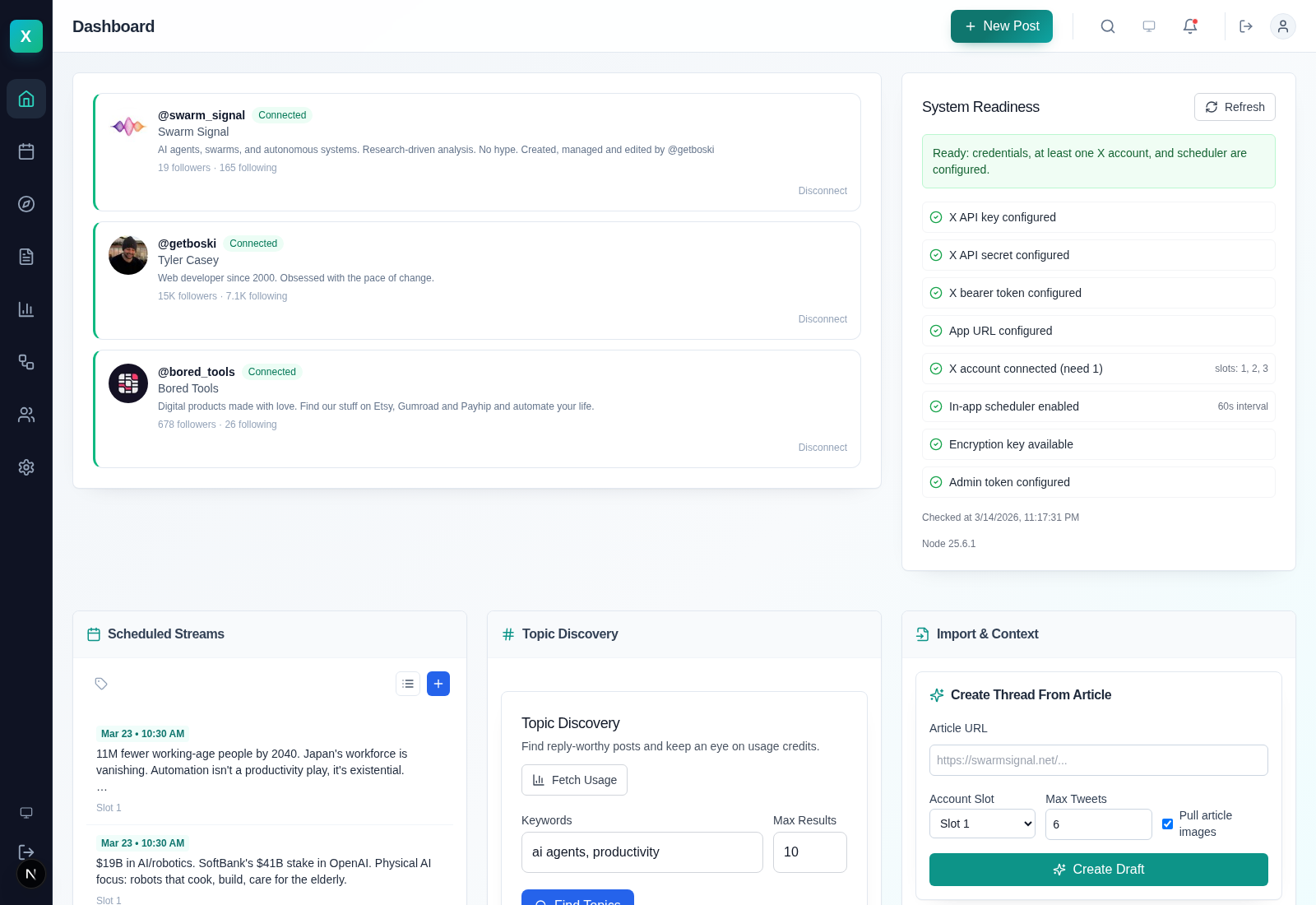
A live self-hosted X/Twitter management platform I built with Claude Code because I needed a native, agent-first setup for running a social media profile. X-Manager handles publishing, scheduling, threads, replies, analytics and approved automation from one local Next.js app backed by SQLite.
The current release runs three live account slots, has a hardened scheduler, exposes a secure Bridge API for external tools, and is honest about its limits. It does publish. Posting, replies, likes, reposts and scheduling are proven. DM automation still depends on X API access.
Why I built it
Most X tooling forces a bad choice. You either get a polished dashboard for humans clicking buttons, or a raw API that assumes you are happy gluing together your own scheduler, approvals, analytics and account management.
I wanted one system that works for both. Something I can run myself, keep local, use during the day, and call from approved automations without sending account data through another monthly SaaS. Claude Code did a lot of the heavy lifting, but the shape of the tool came from a real workflow I needed to run.
What X-Manager does now
Scheduling and threads
Schedule single posts, replies, and multi-post threads. Import from CSV, attach media, reschedule safely, and keep the queue local instead of paying a social scheduling tax forever.
Three account slots
Run three connected X accounts from one control plane. Each slot carries its own tokens and profile state, and every post or action can target a specific slot.
Engagement operations
Reply, like, repost, and schedule engagement actions from the same system. Mentions and inbox workflows live in one place. DM automation is wired in, but still constrained by X product access.
Secure Bridge API
Approved tools can publish through a bearer-authenticated Bridge API with optional HMAC signing, slot allowlists and request validation. This is the bit that makes it useful in workflows rather than just another social media dashboard.
Readiness and auditability
The release now exposes real scheduler health, overdue queue visibility, slot-aware API call logs, and operational receipts so you can tell whether the system is healthy instead of guessing from the UI.
Self-hosted by default
SQLite, encrypted credentials, local uploads, and systemd user service support. It is designed to live on a laptop, a dev box, or a cheap VPS without needing a platform team.
The difference between a demo and a tool I trust
The last stretch of work was not about dressing up the UI. It was about making the scheduler trustworthy. I audited the live system, found overlapping scheduler cycles, stale queue risk, weak readiness reporting, and thin audit coverage, then fixed those failure modes properly.
That meant serialized scheduler loops, explicit posting claims, stale-claim recovery, slot-aware API logs, safe queue cleanup, and readiness checks backed by actual scheduler leases instead of wishful thinking. It also meant reconnecting live accounts, proving posts on all three slots, and moving the service onto a cleaner systemd-managed setup.
Built for workflows, not just dashboards
Commandable API
Agents or scripts can schedule posts, upload media, build threads, inspect readiness and publish through the bridge without screen-scraping the UI. The app ships a machine-readable manifest for that reason.
Guardrails where they matter
Approval flows, slot targeting, idempotency and scheduling claims are there to stop expensive mistakes. This is the part most "agent-friendly" tools skip, then rediscover when they double-post.
Operational receipts
Scheduler health, queue counts, event logs, and API-call traces are built into the product. If something stops firing, there is a path to diagnosis that does not start with guesswork.
Private by default, not as a premium add-on
Credentials are encrypted at rest, sessions are signed, and the bridge can enforce both bearer auth and HMAC request signing. Local storage and self-hosting are not an afterthought here; they are the whole point.
The operational side matters too. The live release was checked for credential leakage into git, queue safety, and bridge exposure. The result is a product I am willing to use for real work, not just a repo I can demo in a screenshot.
Built with
| Framework | Next.js 15 + React + TypeScript |
| Database | SQLite with Drizzle ORM |
| Auth | OAuth 1.0a for connected X accounts, bearer plus optional HMAC for the bridge |
| Security | AES-256-GCM at rest, signed sessions, SSRF protection, replay window checks |
| Scheduling | In-app scheduler with durable leases, posting claims, and stale-claim recovery |
| Ops | systemd user service, tmux/dev tooling, machine-readable agent manifest |
| Runtime | Ubuntu-friendly, Node.js 20+, comfortable on a low-cost VPS |
Up and running quickly
Clone and install
git clone https://github.com/tylerbuilds/x-manager.git && cd x-manager && npm install
Start the app
npm run dev:ensure and open http://127.0.0.1:3999. Add your X app credentials in the setup panel.
Connect your accounts
Authorize up to three X accounts, then schedule posts, run engagement actions, or let an external agent publish through the bridge.
Make it durable
Install the systemd user service if you want the app to persist cleanly across reboots instead of living in a terminal tab.
MIT licensed, practical, and built to be used
If you want to inspect it, run it, fork it, or wire it into your own agent stack, you can. The point of building this in the open was to have a tool that does real work without trapping that work behind somebody else's pricing page.