Robot Routes is about making a plan, seeing what it does and changing it when the robot ends up somewhere unexpected.
I wanted an introduction to computing that starts with something a child can see. A robot has somewhere to go. Arrow cards tell it which way to move, and the map shows what happened to each instruction.
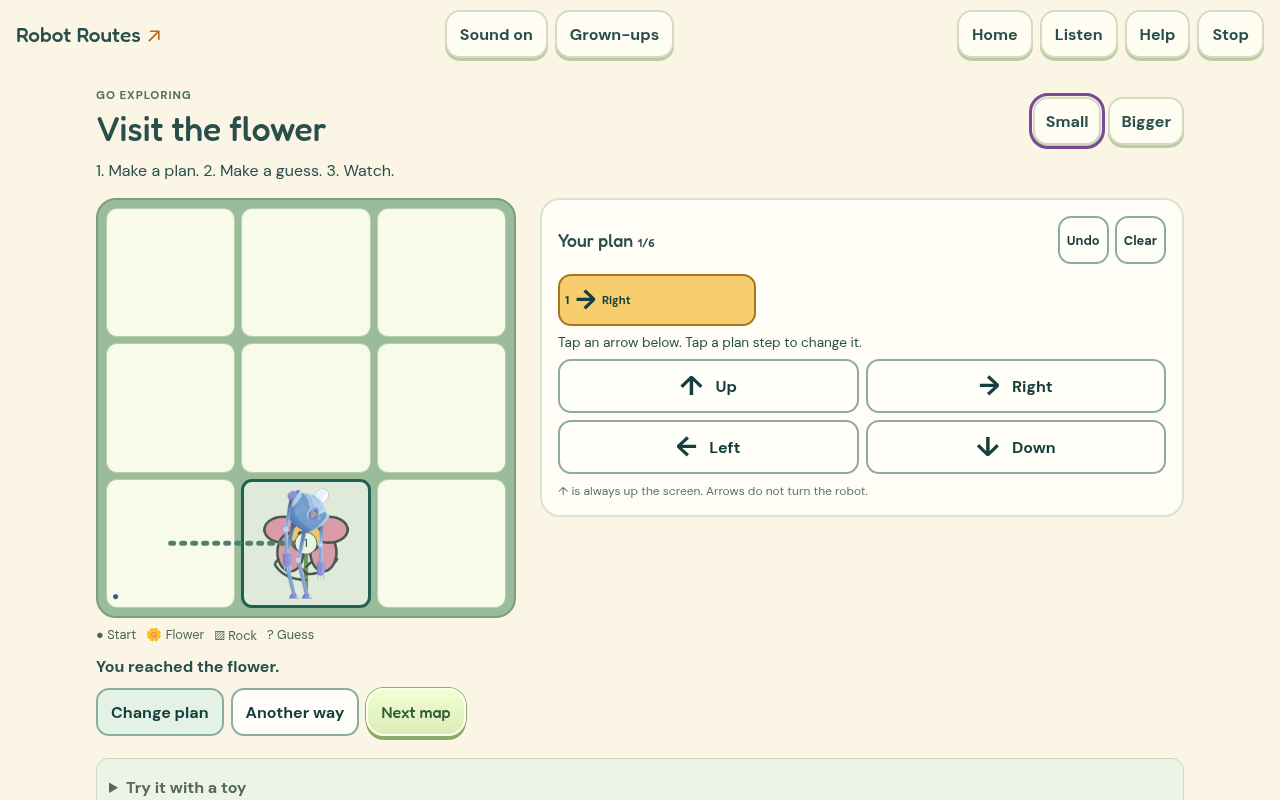
How it works
The first trips are short. A demonstration shows an arrow and its movement before asking for a longer plan. Later trips visit flowers, fish and a bus stop, with obstacles that change the route you need. The arrows always mean directions on the screen; they do not suddenly become turns relative to the robot.
You can guess where a plan will stop, run it and follow the numbered trail. A blocked move points back to the relevant card and place on the map. Another way keeps the first successful route beside a new attempt. The map maker lets you place obstacles and keep your own trips in a picture gallery.
What needed more care
In the early preview, the arrows and Go button were far below the map on a phone. That made it hard to connect an instruction with the movement it caused. The main controls now sit with the board, and the current card is highlighted as the robot moves.
Debugging needs an accurate explanation. A plan that misses the destination should not automatically blame its last card. The game distinguishes a blocked step from a route that simply finishes elsewhere, leaving room to try a different plan.
Checking the learning
The original report asked for prediction and purposeful repair, rather than eventually finding a route by guessing. The game now shows the plan you tried beside the version you changed, highlighting the different instructions. Changing a whole plan is still welcome exploration. The saved record also shows when just one instruction changed. It cannot tell us why the child made that change. Listen and Stop are available during play, and an optional paper or floor-grid activity lets a grown-up be the robot.
What I built it with
I used HTML, CSS and JavaScript for the map and instruction runner. A separate route model works out each step, while approved Moho robot artwork supplies the short reactions. The trail and arrow cards show the actual route rather than a prerecorded success scene.
Codex helped me build and check the game. I generated the complete British English speech recordings locally with Kokoro, so there is no paid AI service needed while you play.
The menus and controls now share Grow Word's locally stored fonts, warm cream colours and rounded buttons. Each game keeps its own play area and pictures.
The game is free to play without an account. Saved work stays in this browser on this device, so clearing browser data can remove it. Once its offline pack has finished saving, the game can be played without a connection.
What I want to check next
I want to watch how children describe a route before they run it, and whether the trace helps them change one instruction with a purpose. More maps should bring new decisions rather than just longer plans.
This is still an early release. Browser testing and independent design reviews help find software and interaction problems. I still want physical phone checks and observation with children before making claims about independent use or learning gains.